Instant Access
Your AUD balance, active bonuses, VIP tier status, and the full game library are all available the moment you log in, on desktop or mobile browser.
Log In to Cleobetra
Access your account from any browser, any device, any time. No app download required.
Keeping Your Account Secure
What You Should Do
What You Should Avoid
What You Get When You Sign In
Instant Access
Your AUD balance, active bonuses, VIP tier status, and the full game library are all available the moment you log in, on desktop or mobile browser.
Secure Session
Every login session is protected by SSL 256-bit encryption. Two-factor authentication is available and can be activated from account settings for an extra layer of protection.
Play on Any Device
Cleobetra works in Safari, Chrome, and Firefox on Android 9.0+ and iOS 14.0+ without a download. Add a PWA shortcut to your home screen for one-tap access.
Cleobetra uses a standard email-and-password authentication system. No social media login or third-party sign-in service is available. Enter the email address you registered with and your password, then click Sign In. If you selected two-factor authentication when setting up your account, a verification code will be sent to your registered contact before the session opens.
When your session begins you land directly in the main lobby with your AUD balance visible, your active bonus status displayed, and all 11,000+ games, the sportsbook, and the cashier accessible from the navigation menu. No extra steps separate login from play.
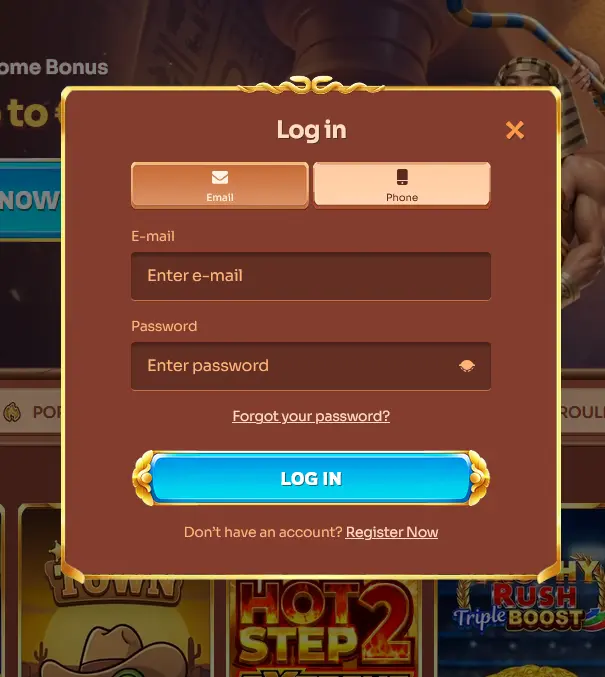
Cleobetra has no downloadable client, so every login happens in a browser. The process is identical regardless of which device you use.
Open cleobetraaussie.com in any modern desktop browser (Chrome, Firefox, Edge, or Safari). Click the Sign In button in the top-right corner. Enter your registered email address and password in the fields provided. If two-factor authentication is active on your account, retrieve the verification code from your authenticator app or registered email and enter it when prompted. Click Confirm to open your session. Your account dashboard, AUD balance, and bonus wallet load immediately.
On Android 9.0 or later, open Chrome and navigate to cleobetraaussie.com. On iOS 14.0 or later, open Safari or Chrome and do the same. The mobile site detects your screen size automatically and adjusts to a touch-friendly layout. Tap Sign In, enter your credentials, and complete any two-factor step if applicable. The full lobby, sportsbook, and cashier are all available in the mobile browser without installing anything.
Cleobetra does not have a native app in the Google Play Store or Apple App Store. The practical equivalent is a Progressive Web App shortcut added to your home screen. On Android, tap the three-dot menu in Chrome and select Add to Home Screen. On iOS, tap the Share icon in Safari and choose Add to Home Screen. Tapping this shortcut opens the Cleobetra site in a borderless window that behaves like a native app, with your login credentials saved if you chose that option in your browser settings.
A strong Cleobetra account starts with a password that is unique to this platform. Avoid dictionary words and sequences. The minimum requirement is a combination of uppercase letters, lowercase letters, numbers, and at least one special character. Two-factor authentication adds a second confirmation step on every login, which means a stolen password alone is not sufficient to access your account. Enable it from the Security section of your account settings.
If you are playing from a shared device such as a library computer or a friend’s phone, disable the save-password prompt and manually log out after each session. The browser cache can retain login tokens even after the tab is closed, so clearing it is a sensible extra step.
Cleobetra’s support staff will never ask for your password in any communication channel. Any message requesting your password should be treated as a phishing attempt and reported to [email protected].
Several issues can prevent a successful login, and most are resolved quickly.
Incorrect credentials are the most common cause. Check that Caps Lock is off and that you are entering the email address used during registration, not an alias or alternative address. If you are uncertain, use the Forgot Password link on the login screen to send a reset email to your registered address.
A locked account occurs after several consecutive failed login attempts as an automated security measure. The account unlocks automatically after a short waiting period, or you can contact the 24/7 live chat team to restore access immediately.
Browser compatibility issues occasionally affect older browser versions. Cleobetra runs on HTML5 and is optimised for current releases of Chrome, Firefox, Safari, and Edge. If the login page behaves oddly, clear your cache, disable browser extensions, or switch to a different browser.
If a VPN or proxy service is running, the platform’s location-detection system may flag the session. Disable any VPN before attempting to log in from Australia.
New players can open a Cleobetra account directly on the homepage in under three minutes. At registration you choose your welcome offer: the casino package of up to $1,500 and 350 free spins on Cash of Egypt across three deposits, the sports welcome bonus of 100% up to $200, or no bonus at all. Select AUD as your account currency during registration, as this cannot be changed afterwards. Once your email address is confirmed via the link sent to your inbox, your account is active and you can make a first deposit to claim your chosen welcome offer. You must be 18 or older to register.
Login Questions Answered
On the login screen, click the Forgot Password link and enter the email address registered to your account. A reset link will be sent to that inbox within a few minutes; check your spam folder if it does not arrive.
Yes. On the mobile browser you can choose to remain logged in, though Cleobetra may prompt for re-authentication after an extended period of inactivity as a security measure.
Contact the 24/7 live chat team or email [email protected] with your registered email address and personal details so the team can verify your identity and restore access.
Sign In and Start Playing
Grab 100% up to $1,500 and 350 free spins.
Enter Casino Must be 18 or older to play. Gambling involves risk of dependency. Bonus offers are subject to their own terms.