Android
- Android 9.0 (Pie) or later
- Browser: Chrome (recommended), Firefox
- No APK file or sideloading required
Cleobetra on Mobile
The full Cleobetra experience runs in your mobile browser on any Android or iOS device, with no app download required and nothing to install.
The full Cleobetra experience runs in your mobile browser on any Android or iOS device, with no app download required and nothing to install.
The full Cleobetra experience runs in your mobile browser on any Android or iOS device, with no app download required and nothing to install.
Open on Mobile Must be 18 or older to play. Gambling involves risk of dependency. Bonus offers are subject to their own terms.
How to Get Started on Mobile
Device Requirements
Android
iOS
Mobile Security Best Practices
What You Should Do
What You Should Avoid
Why Cleobetra Works on Mobile
No Download Required
Cleobetra runs as a responsive HTML5 site in any modern mobile browser. The full game library, sportsbook, cashier, and live chat are accessible without installing anything from an app store.
PWA Home Screen Shortcut
Add Cleobetra to your home screen as a Progressive Web App in two taps. It opens in a borderless window that behaves like a native app, with push notifications for new bonuses available on Android.
Encrypted Mobile Sessions
Every mobile session runs over TLS encryption, protecting your AUD balance, payment details, and personal data whether you are on Wi-Fi or a mobile data connection.
Mobile at Cleobetra: What to Know
Pros
Cons
Cleobetra on mobile is not a stripped-back version of the desktop site. Everything available at a desk is available on a phone or tablet, through the browser, without installing anything.
The mobile browser experience includes the complete 11,000+ game library with provider and category filters, the full sportsbook with AFL, NRL, cricket, tennis, and live in-play markets, the AUD cashier with every payment method available on desktop, bonus activation and bonus wallet tracking, live chat support accessible without leaving the game, and the full VIP dashboard showing tier progress and cashback eligibility. Search and filter functions work via touch, and the lobby grid resizes cleanly across screen widths from compact phones to larger tablet displays.

The mobile experience matches the desktop version in feature coverage. The practical differences are input-related rather than functional: text entry uses the on-screen keyboard, and some bonus shop and tournament pages work better in landscape orientation on smaller screens. Push notifications for new bonus offers and promotions are available on Android via the PWA shortcut. iOS does not currently support web-based push notifications for the Cleobetra PWA.
Cleobetra uses a browser-based PWA model rather than a native download, so there is no APK file for Android and no App Store listing for iOS. The steps below cover both platforms.
Open Chrome on your Android device running version 9.0 or later. Navigate to cleobetraaussie.com. Wait for the page to fully load. Tap the three-dot menu icon in the top-right corner of Chrome. Select Add to Home Screen from the menu that appears. A dialogue box will ask you to name the shortcut. Keep the default name or change it, then tap Add. The Cleobetra icon appears on your home screen. Tap it at any time to open a borderless session with the casino loading directly, without the Chrome toolbar visible.
Open Safari on your iPhone or iPad running iOS 14.0 or later. Navigate to cleobetraaussie.com. Once the page loads, tap the Share icon, which is the box with an upward arrow at the bottom of the screen. Scroll through the Share menu and tap Add to Home Screen. Name the shortcut and tap Add in the top-right corner. The Cleobetra icon appears on your home screen. Opening it launches the site in a full-screen Safari session without the address bar visible.
Both of the above methods produce what is technically a Progressive Web App shortcut. The site itself contains the PWA manifest, which tells the browser to open it in a standalone window. Performance depends on your browser version and device hardware. On a current mid-range phone with a stable data connection, all game categories load within a few seconds and live casino streams run without buffering. Clearing your browser cache periodically helps maintain smooth loading if performance degrades over time.
| Spec | Android | iOS |
|---|---|---|
| Minimum OS | Android 9.0 (Pie) | iOS 14.0 |
| Recommended Browser | Chrome | Safari |
| Alternative Browser | Firefox | Chrome |
| Native App | Not available | Not available |
| PWA Shortcut | Supported | Supported |
| Push Notifications | Supported | Not supported |
Every game category available on desktop is accessible via the mobile browser.
The 5,000+ pokie library covers three-reel classics, video pokies with expanding symbols, Megaways titles with up to 117,649 ways to win, bonus-buy pokies, and progressive jackpot games. Cash of Egypt (Pragmatic Play), Book of Dead (Play’n GO, RTP 96.21%), Gates of Olympus (Pragmatic Play, RTP 96.5%), and Wanted Dead or a Wild (Hacksaw Gaming, RTP 96.38%) all load on mobile with identical gameplay to the desktop version. Demo mode is available on most titles, letting you test mechanics before wagering real money.
Live casino tables from Evolution Gaming and Ezugi stream in HD on mobile. Crazy Time, Lightning Roulette, Monopoly Live, and Speed Blackjack are among the titles tested and confirmed to run on current Android and iOS browsers. Betting limits on live tables are the same as on desktop, ranging from $1 to $10,000 per hand depending on the table.
The 245+ digital table game variants, including blackjack, roulette, baccarat, and poker, are fully playable on the mobile touchscreen. The interface adapts bet placement and card dealing animations to touch input without reducing functionality.
Progressive jackpot pokies load on mobile and can be played with real-money wagers. Note that jackpot games are excluded from bonus fund play; a real-money balance is required.
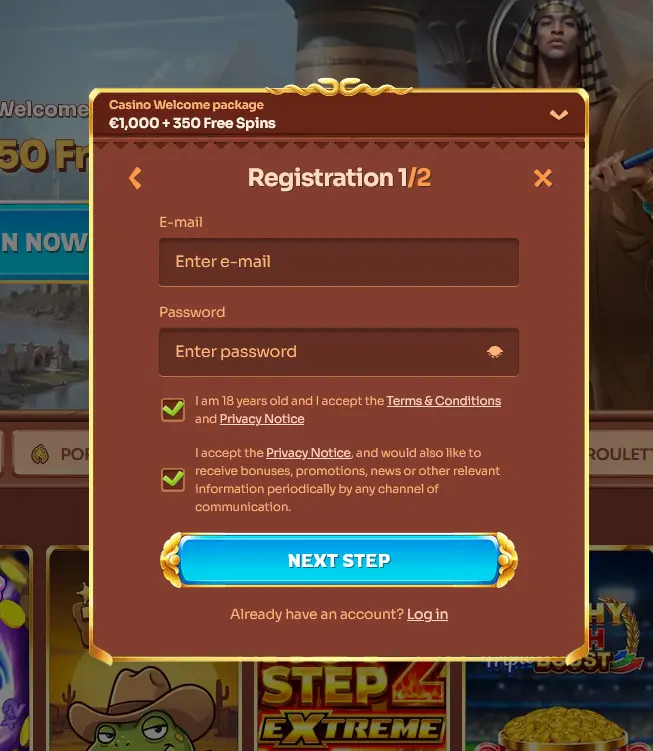
Registration on mobile follows the same process as on desktop. Open cleobetraaussie.com in your mobile browser, tap the Register button, and fill in your email address, password, full name, date of birth, country (select Australia), and address. Choose AUD as your account currency. This selection cannot be changed after registration. Tick the age confirmation box to confirm you are 18 or over, then submit the form. A confirmation email will arrive within a few minutes. Tap the verification link to activate your account. You are then ready to deposit and claim your welcome offer.
Tap Sign In on the mobile homepage, enter your registered email address and password, and complete any two-factor authentication step if you have it enabled. Your session opens with your full AUD balance and bonus wallet visible. To avoid re-entering credentials each visit, allow your browser to save the password when prompted, provided you are on your own personal device.
All Cleobetra bonuses are available via the mobile browser. There are no bonuses restricted to desktop only, and no mobile-exclusive codes are required. The full bonus conditions are on the bonus page. 18+ only.
The three-stage welcome package of up to $1,500 and 350 free spins on Cash of Egypt is claimable entirely through the mobile cashier. Tap the deposit button, choose your payment method, enter an amount of at least $30, and the bonus activates automatically. The free spins are usable directly in Cash of Egypt from the mobile lobby. 18+ only.
The full AUD cashier is available on mobile. Visa and Mastercard process instantly. MiFinity and Jeton e-wallets are fast alternatives that qualify for bonus offers. Neosurf prepaid vouchers are accessible on mobile by entering the voucher code in the cashier field. Bank transfer is available for larger amounts. Bitcoin, Ethereum, Litecoin, Dogecoin, and USDT TRC20 are all accepted. Skrill and Neteller deposits do not qualify for any welcome bonus tier.
| Method | Deposit | Withdrawal |
|---|---|---|
| Visa / Mastercard | Instant | 3-5 business days |
| MiFinity / Jeton | Instant | 24-48 hours |
| Neosurf | Instant | Not available (deposit only) |
| Bitcoin / ETH / LTC | 10-30 mins | 24-48 hours |
| Bank Transfer | 1-3 business days | 3-5 business days |
All cashier transactions on mobile are protected by TLS encryption, the same standard used on desktop. Payment details are not stored on your device. KYC verification, including an Australian passport or driver’s licence and a proof of address such as a utility bill or bank statement, must be completed before your first withdrawal is processed regardless of whether you are playing on mobile or desktop.
Live chat is accessible from the mobile site at any point, even mid-game, by tapping the chat icon. Average response time is under 3 minutes around the clock. For detailed queries, documentation submissions, or account review requests, email [email protected]. The Help Centre FAQ is available under the main menu and covers deposits, withdrawals, bonuses, account verification, and game queries without requiring a live agent.
All responsible gambling tools available on desktop are accessible on mobile: deposit limits, loss limits, session limits, reality checks, time-out periods, self-exclusion, and the self-assessment test. These are managed from the account settings menu in the mobile browser. Cleobetra encourages players to set deposit and session limits before their first deposit. 18+ only. If you feel your gambling is becoming a problem, use the self-exclusion tool or contact support for guidance on connecting with appropriate help services.
Mobile Questions Answered
No. At this time Cleobetra does not offer a downloadable native app. The platform is fully accessible via the mobile browser on iOS 14.0+ and Android 9.0+, and a PWA shortcut can be added to your home screen for app-like access.
Yes. The entire game library, including pokies from Pragmatic Play and Play'n GO and live casino tables from Evolution Gaming and Ezugi, loads in the mobile browser. No titles are reserved for desktop only.
Yes. The full AUD cashier is available on mobile, including Visa, Mastercard, Neosurf, MiFinity, bank transfer, and cryptocurrency options. Deposit and withdrawal limits are the same as on desktop.
Open Cleobetra on Your Phone Now
Grab 100% up to $1,500 and 350 free spins.
Enter Casino Must be 18 or older to play. Gambling involves risk of dependency. Bonus offers are subject to their own terms.